Platform
A canvas for people who can read the code underneath.
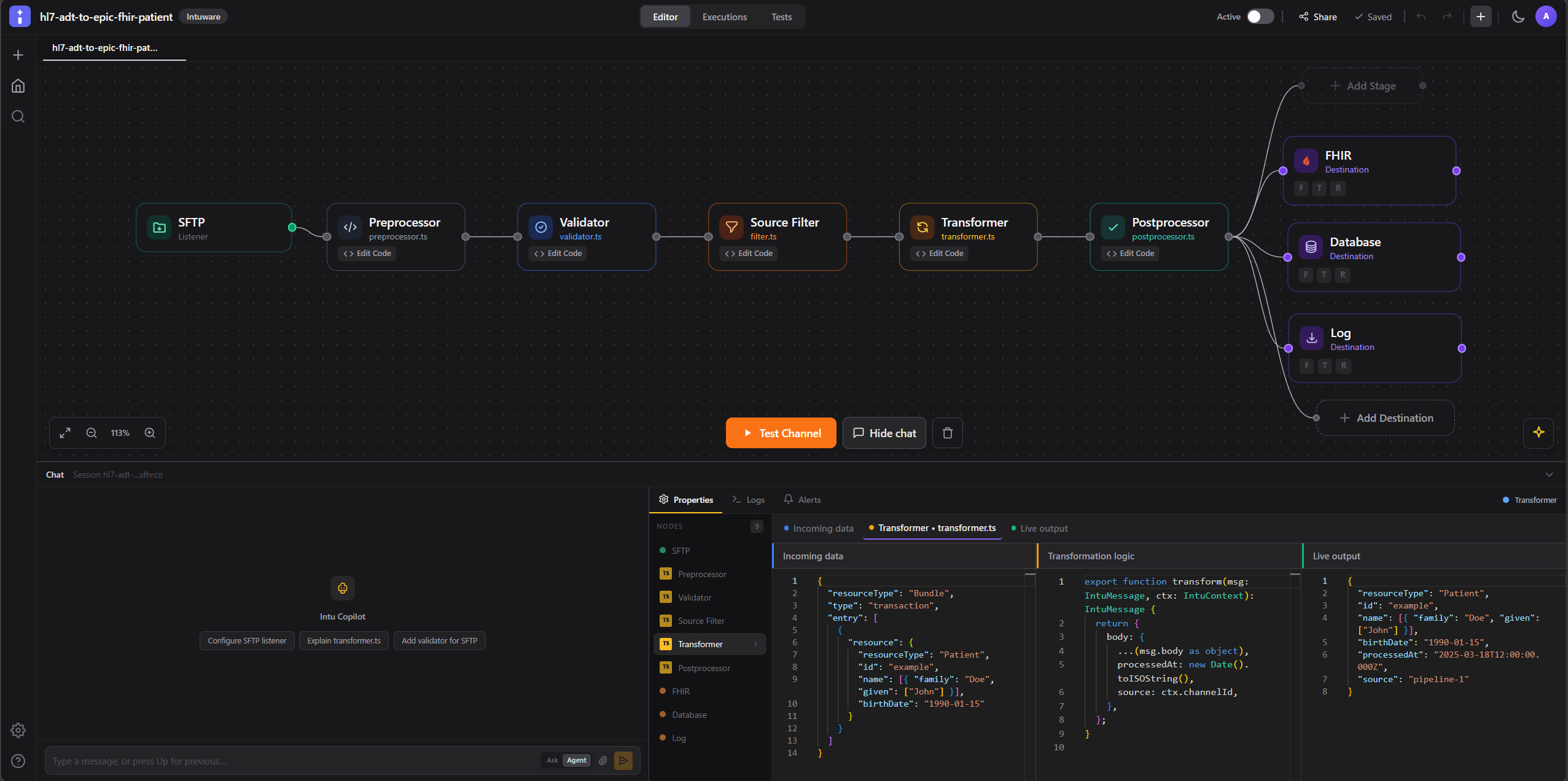
The IntuCloud designer is a full-screen React Flow canvas where a channel takes shape as nodes and edges. Underneath, it is a channel.yaml file and a folder of TypeScript stages — the same project the open-source engine runs.
Canvas
Design the whole channel at a glance.
A channel in a legacy interface engine lives in a GUI backed by a database, and the only way to review a change is to click through it. Here the canvas and the repository are the same artifact. Open the designer, change a mapping, and the diff is a TypeScript file.
That matters most when something breaks at 2am: the channel that is running in production is a set of files you can read, blame, and revert.
- Full-screen React Flow canvas — sources on the left, stages in the middle, destinations fanning right.
- Stage chips on each node show which stages are enabled without opening anything.
- Add destinations from a palette; each carries its own filter, transformer and response transformer.
- The canvas is a view of
channel.yaml— rearranging nodes changes a file, not a hidden database row.
Pipeline
Nine stages, all TypeScript.
Five stages run once per inbound message on the source side. Three more run per destination, so a channel that fans out to three systems can shape each payload independently.
Source stages — run once per message
- 1
Preprocessor
Normalize the raw payload before anything else touches it — encoding fixes, line endings, envelope stripping.
- 2
Validator
Assert the message is what you expect. Reject structurally invalid input at the edge instead of downstream.
- 3
Filter
Decide whether this message belongs in this channel at all. Return false and the message stops here.
- 4
Transformer
The main mapping step: reshape HL7 segments into FHIR resources, enrich, or restructure as needed.
- 5
Postprocessor
Run after the source pipeline completes — bookkeeping, acknowledgement shaping, side effects.
Per-destination hooks
- 1
Filter
Per destination: should this particular endpoint receive this message?
- 2
Transformer
Per destination: shape the payload for that specific system — a FHIR bundle here, a flat file there.
- 3
Response Transformer
Interpret what the destination sent back and decide whether it counts as success.
Five source stages plus three destination hooks, plus the destination dispatch itself — the nine stages a message can pass through on its way out.
TypeScript
Real TypeScript, not a scripting dialect.
Transformer logic is ordinary TypeScript running on a Node.js worker pool. If you can write it in a modern codebase, you can write it in a stage — modern syntax, real types, and the standard library you already know.
The in-browser runner executes the stage against whatever sample message you point it at and shows you the output. Nothing is deployed and no environment is consumed while you are still working out the mapping.
- Monaco editor with type checking, completion and inline errors.
- npm type packages available —
@types/fhirfor FHIR resource shapes, for example. - Run a stage in the browser against a sample message in a Web Worker, before anything deploys.
- Iterate on a mapping in seconds instead of a deploy cycle.
Test data
Bring the messages you actually receive.
Good integration work is mostly about the messages that do not look like the specification. The test-data library exists so the odd ones become fixtures rather than folklore.
On the Free plan, test data must be synthetic — PHI is permitted only on Team and Enterprise under a BAA. See Security & Compliance.
- Upload HL7 v2, FHIR and CDA samples into the project test-data library.
- Capture payloads directly from sandbox runs and save them as fixtures.
- Re-run any stage against a saved fixture to check a change before promoting it.
- Keep synthetic fixtures in the repository so the next engineer inherits them.
Migration
Start from the channels you already run.
Most teams do not start with a blank canvas. The import wizard reads Mirth Connect channel XML and rebuilds it as an intu-dev project, so the first thing you see in the designer is something you recognize.
- Import Mirth Connect channel XML through the in-app wizard.
- Imported channels arrive as editable visual pipelines, not read-only documents.
- The engine CLI equivalent is
intu import mirthfor scripted bulk migration. - Review, test in the sandbox, then promote — channel by channel, at your pace.
Git-friendly
Everything is a file. Nothing is trapped.
Portability is a design constraint here, not a marketing line. The designer writes the same project layout the open-source engine reads, which is what makes "export and leave" a real option rather than a promise.
- Publish creates a revision you can inspect and roll back to.
- Export the whole project as a portable intu-dev project at any time.
- The exported project runs on the open-source engine with no IntuCloud account.
- Channels and projects are unlimited on every plan, including Free.
Explore the platform
Start building today.
Free plan, no credit card — design and test unlimited channels.